
アプリケーションプロパティを安全に隠す
CloudHub では、安全な隠しアプリケーションプロパティがサポートされています。つまり、プロパティの名前は Anypoint Runtime Manager に表示されますが、値はどのユーザーにも表示されず、取得することもできません。 プロパティは機密情報を公開せずに実行時に解決されます。
内部では、安全な隠しアプリケーションプロパティは暗号化され、MuleSoft 管理 CloudHub プロパティデータベースに保存されます。このデータベースはユーザー組織ごとに暗号化されます。
CloudHub ワーカーにデプロイされたアプリケーションまたはハイブリッドデプロイメントの場合、Runtime Manager を使用して隠しプロパティを設定できます。 その他のデプロイメントオプションを使用してデプロイするアプリケーションでは、デプロイ可能なアプリケーションのアーカイブファイルにバンドルされるセキュアなプロパティプレースホルダーファイルを使用する必要があります。
| 安全な隠しアプリケーションプロパティは、セキュアな設定ファイルに保存される暗号化された Mule アプリケーションのプロパティとは別の機能および概念です。 「セキュア設定プロパティ」を参照してください。 |
概要
アプリケーションプロパティは、Mule アプリケーションでプレースホルダーとして動作する変数で、実行時に設定されます。 Runtime Manager でアプリケーションをデプロイ、または既存のアプリケーションを更新するときに、Mule Runtime Engine は [Properties (プロパティ)] タブで設定される情報を使用してプロパティの変数の値を提供します。
たとえば、ユーザー名が ${dbUsername}、パスワードが ${dbPassword} に設定される JDBC Connector を設定できます。
Runtime Manager で、これら 2 つのプロパティをアプリケーションプロパティとして設定できます。
機密情報の場合は、これらのプロパティに非表示としてフラグを付けることができます。そうすると、Runtime Manager で入力および保存された後、それらの値はコンソールに表示されず、コンソールと CloudHub サーバーの間で渡されることもありません。
| ハイブリッドデプロイメントの場合、再デプロイ後も値は表示されたままになります。 |
安全な隠しアプリケーションプロパティの作成
安全な隠しアプリケーションプロパティを作成する手順は次のとおりです。
-
適切なファイルにプロパティを追加します。
Mule 4.0 以降では、
secureProperties キーの下にある mule-artifact.json ファイルに安全に隠すプロパティ名がカンマ区切り配列としてリストされます。{ "configs": [ "testprops-app.xml" ], "secureProperties": ["password", "birthdate"], "redeploymentEnabled": true, "name": "secure-properties", "minMuleVersion": "4.2.1", "requiredProduct": "MULE_EE", "classLoaderModelLoaderDescriptor": { "id": "mule", "attributes": { "exportedResources": [] } }, "bundleDescriptorLoader": { "id": "mule", "attributes": {} } }5 行目には 2 つのセキュアなプロパティが示されています。
secureProperties エントリは、定義されている場所 (または定義されているか否か) に関係なく、すべてのプロパティに影響します。ローカルテストを実行する場合は、プロパティとその値を定義する YAML ファイルを作成して
src/main/resources フォルダーに追加します。http: port: 8081 username: "testuser" password: "testpass123" birthdate: "01/01/2006"Mule 3 では
mule-app.properties ファイルにプロパティを配置します。db.user=john db.password=mypassword salesforce.user=john1 salesforce.password=mysfpassword secure.properties=db.password,salesforce.password -
Mule アプリケーションを CloudHub にデプロイします。
-
[Applications (アプリケーション)] ページでアプリケーション名をクリックしてから [Settings (設定)] をクリックします。
-
[Properties (プロパティ)] タブで、[Text View (テキストビュー)] をクリックしてからアプリケーションのプロパティを入力します。
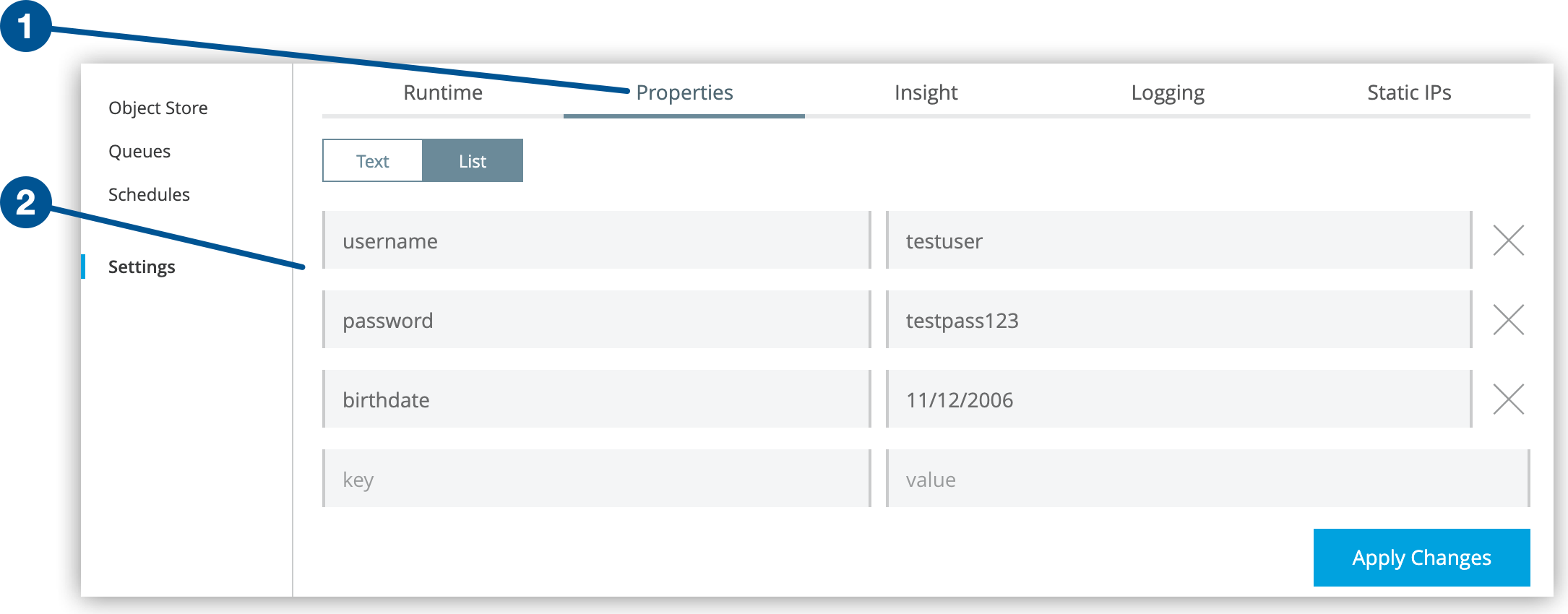 Figure 1. このスクリーンショットには、[Settings (設定)] ページの (1) [Properties (プロパティ)] タブと (2) キー-値プロパティが表示されています。
 -
[Apply Changes (変更を適用)] をクリックします。
-
アプリケーションを再デプロイまたは再起動します。
アプリケーションを再デプロイしたら、[Properties (プロパティ)] タブに移動します。 安全な隠しプロパティとしてマークしたプロパティの値は、これで自分にも他のユーザーにも表示されなくなります。
次の例では、
birthdate と password が安全に隠されていますが、username は隠されていません。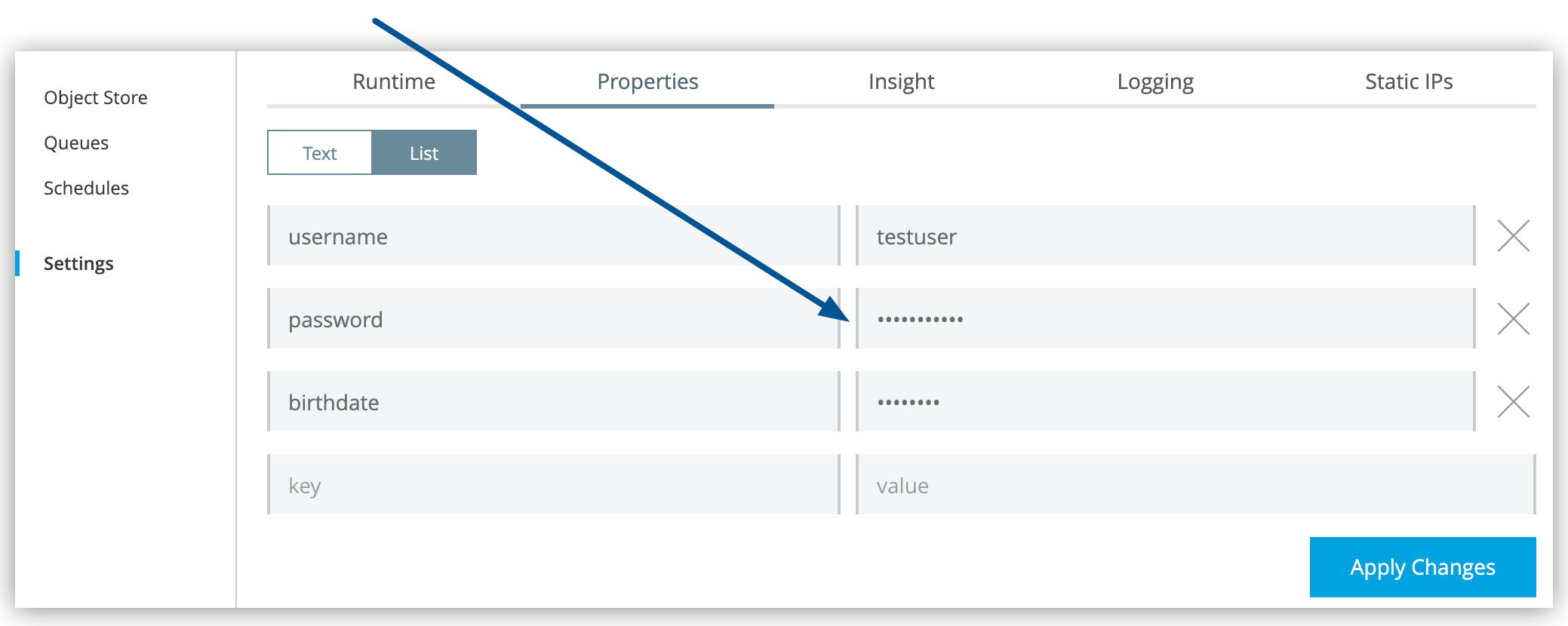 Figure 2. 矢印は、[Servers (サーバー)] ページの [Properties (プロパティ)] タブの隠し値を示しています。
値をコミットし、アプリケーションをアップロードしたら、安全な隠しプロパティはコンソールに表示されなくなります。また、コンソールと CloudHub サーバーの間で送受信されることもありません。
プロパティの設定後はプロパティを取得することはできませんが、新しい値で上書きすることはできます。 値を更新するには、項目に新しい値を入力します。
安全な隠しアプリケーションプロパティを持つアプリケーションがデプロイされたら、CloudHub ではそれらのプロパティのセキュリティフラグが維持されます。
アプリケーションファイルを編集して mule-artifact.json ファイルから secureProperties 定義を削除し、編集したアプリケーションファイルを CloudHub にアップロードしたとしても、CloudHub では安全な隠しプロパティとして以前にフラグが付けられたプロパティの非表示が維持されます。
Sandbox 間での安全な隠しアプリケーションプロパティのコピー
アプリケーションを Sandbox 間で移動するとき、安全な隠しアプリケーションプロパティの値は新しい環境にコピーされません。すべての安全な隠しアプリケーションプロパティの名前はコピーされますが、値は空白のままになります。
暗号化されたアプリケーションプロパティと安全な隠しアプリケーションプロパティ
Mule アプリケーションでは、セキュアなプロパティプレースホルダーを使用して、値が暗号化されたプロパティを保存することもできます。
セキュアな設定プロパティの作成と使用についての詳細は、「セキュアな設定プロパティ」を参照してください。
Mule アプリケーションでは、暗号化されたプロパティを使用して、Mule アプリケーションのデプロイ可能な .jar アーカイブファイル内にセキュアなプロパティプレースホルダーファイルがバンドルされます。
セキュアなプロパティプレースホルダーは、暗号化されたプロパティを含むファイルと、セキュアなプロパティ値を暗号化するために使用される暗号化アルゴリズムの詳細の組み合わせで構成されます。セキュアなプロパティは、秘密鍵を使用して暗号化されます。秘密鍵は、Mule アプリケーション内には絶対に保存しないでください。その代わりに、デプロイ時に秘密鍵値を安全 (セキュア) に渡す必要があります。
Mule アプリケーションに秘密鍵を安全に渡すには、秘密鍵値を表すプロパティプレースホルダーを使用して Mule アプリケーションを開発します。オペレーターがデプロイ時に秘密鍵値を安全に渡すには、いくつかの方法があります。
ファイルシステムとコマンドラインにアクセスできるオンプレミスのデプロイメントでは、システム環境変数を設定することで Mule Runtime のスタートアップ時に秘密鍵を渡すことができます。ファイルシステムがセキュリティで保護されている場合は、ファイルシステムにある特別なセキュアフォルダーに秘密鍵を保存することもできます。Mule アプリケーションの制限付き権限でスタートアップ時に秘密鍵を読み取るようにすると安全です。
秘密鍵がメモリに読み込まれたら、Mule アプリケーションではそれを使用してセキュアなプロパティプレースホルダーのその他すべてのプロパティを復号化し、復号化された値はメモリに保存されます。Mule アプリケーションをセキュリティで保護するには、Mule アプリケーションのメモリまたは JVM メモリを誰も読み取ることができないよう、Mule Runtime のホストへのアクセスをロックダウンすることが重要です。
|
セキュリティプロパティモジュールを使用して定義されたプロパティに、 |
暗号化されたプロパティを使用する CloudHub アプリケーションの開始
Mule アプリケーションは、セキュアなプロパティプレースホルダーファイルに暗号化されたプロパティが保存されるよう開発することもできます。
CloudHub デプロイメントの場合、オペレーターには CloudHub ワーカーのファイルシステムへのアクセス権がなく、コマンドラインにログインして CloudHub ワーカーをスタートアップすることもできないため、お客様がホストするデプロイメントで説明したセキュアなデプロイメントアプローチは CloudHub ではどれも使用できません。
また、Mule アプリケーションの mule-artifact.json ファイルの secureProperties エントリに、暗号化されたプロパティの名前をリストすることで、暗号化されたプロパティに安全な隠しアプリケーションプロパティとしてフラグを付けることもできます。具体的には、暗号化されたプロパティを復号化するために使用する秘密鍵を、mule-artifact.json ファイルの secureProperties 鍵で安全な隠しプロパティとして設定できます。
例を挙げます。
config.yamlhttp:
port: 8081
username: "testuser"
password: "![r8weir09458riwe0r9484oi]"
birthdate: "01/01/2015"mule-artifact.json{
"configs": [
"secure-properties.xml"
],
"secureProperties": ["secure::password", "birthdate", "secure.key"],
"redeploymentEnabled": true,
"name": "secure-properties",
"minMuleVersion": "4.1.1",
"requiredProduct": "MULE_EE",
"classLoaderModelLoaderDescriptor": {
"id": "mule",
"attributes": {
"exportedResources": []
}
},
"bundleDescriptorLoader": {
"id": "mule",
"attributes": {}
}
}その後、デプロイ時に、オペレーターは Runtime Manager の [Properties (プロパティ)] タブに secure.key 値を入力できます。 安全な鍵には、コンソールに表示されないようフラグが付けられているため、オペレーターが入力している内容は誰にも表示されません。
秘密鍵が Mule アプリケーションに渡されたら、お客様がホストするデプロイメントと同じように、暗号化されたプロパティがメモリ内に複合化されます。CloudHub ワーカーは高度なセキュリティで保護されているので、これを CloudHub で行うと安全です。CloudHub ワーカーのコマンドラインはアクセス不可能で、侵入者が CloudHub ワーカーのメモリまたは JVM プロパティを読み取る手立てもありません。
暗号化されたプロパティの上書き方法
セキュアなプロパティプレースホルダーファイル内で Mule アプリケーションにバンドルされる暗号化されたプロパティは、Runtime Manager の [Properties (プロパティ)] タブには表示されません。これによって値は Mule アプリケーション内部に安全にロックされます。
暗号化されたプロパティの名前が Mule アプリケーションの mule-artifact.json の secureProperties エントリにもリストされている場合、アプリケーションがデプロイされると、複合化されるプロパティと同じく、この暗号化されたプロパティの値も Runtime Manager の [Properties (プロパティ)] タブには表示されません。
複合化された値は Mule ワーカーのメモリに安全に保存され、暗号化された値はユーザーアカウントの CloudHub データベースに安全に保存されます。復号化された値は、CloudHub ワーカーのファイルに保存されたり、(Runtime Manager コンソールを含む) その他のマシン間で渡されたりすることは決してありません。
したがって、Mule アプリケーションの secureProperties エントリで安全な隠しプロパティとしてもマークされている暗号化されたプロパティの場合は、暗号化されたプロパティをクリアテキスト値に安全に置き換えることができます。クリアテキスト値は、CloudHub プロパティデータベースに安全に保存され、Mule アプリケーションが開始されるたびに、Mule アプリケーションに安全に渡されます。
CloudHub デプロイメントの場合は、アプリケーションがデプロイされると、新しい値は非表示になり、二度と参照することはできません。 ハイブリッドデプロイメントの場合、再デプロイ後も新しい値は表示されたままになります。
つまり、アプリケーションで CloudHub の [Properties (プロパティ)] タブでセキュアなプロパティを上書きするときには、値を暗号化しないでください。このシナリオでは、セキュアアプリケーションのデプロイまたは再デプロイ時にアプリケーションのソースファイルの値へのアクセス権を持つユーザーのみが、セキュアなプロパティを上書きできます。
セキュアなプロパティを上書きする必要があるケースとしては、本番アプリケーションで db.user と db.password という 2 つのプロパティに保存されているデータベースユーザーとパスワードを更新する必要がある場合などがあります。アプリケーションで CloudHub の [Properties (プロパティ)] タブで新しい db.user と db.password の値を入力して、アプリケーションを起動または再起動します。これにより、新しいアプリケーションでは、このセキュアなログイン情報をダウンタイムなしでアップグレードできます。
すべての連動アプリケーションを移行したら、古いアカウントの使用を停止できます。
アプリケーションの [Properties (プロパティ)] タブで [Table View (テーブルビュー)] を使用してプロパティを更新する場合は、プロパティ名のコロンをエスケープする必要はありません (例: secure::someproperty)。[Text View (テキストビュー)] を使用してプロパティを更新する場合は、プロパティ名のコロンをエスケープする必要があります (例: secure\:\:someproperty)。
|